What you’ll be able to do
The clinician-selected full-arch package is represented by reviewable grouped steps in the intended jaw.
Before you start
- An editable plan and plan-edit permission
- A clinician-assessed current chart and patient-specific proposal
- The intended Full arch package and component items in the clinic catalogue
Begin with the general planning workflow
Create or open the patient's plan. Record current findings in Diagnosis and review any treatments already planned. Full-arch packages are one way to add a proposal in Treatments; they are not the starting point for every treatment plan.
Each package is a software default with a fixed number of fixtures. It is not a clinical recommendation and does not establish which protocol suits the patient. The responsible clinician decides the proposal; this guide explains how that proposal is entered and checked in Medquote.
Choose the package and jaw
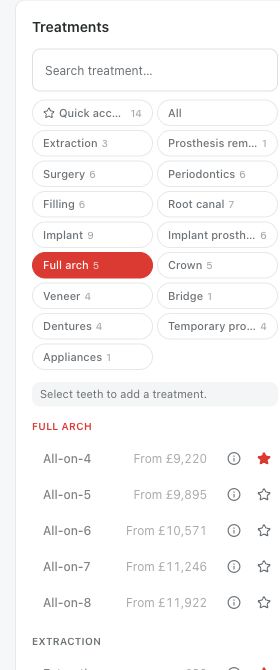
In Treatments, select a tooth in the intended jaw and choose the appropriate package from Full arch. A selection confined to one jaw lets the editor infer that jaw; otherwise use the Upper jaw or Lower jaw dialog. Check the chosen jaw before confirming.
Medquote expands the package into component steps rather than charging the package name as one row. The number of fixtures is not the number of superstructure units. Review the generated rows, quantities, variants and prices.
- Open Treatments in the intended patient’s plan.
- Select a site in the intended upper or lower jaw.
- Choose the clinician-selected All-on-X package in Full arch.
- Confirm the jaw if prompted.
- Review the actual grouped steps and quote.
All-on-4 example
Choose All-on-4 to add the four-fixture package for the selected jaw. In the upper jaw the default sites are 15, 12, 22 and 25. Check the generated sites and components on the chart; they are software defaults, not a patient-specific placement prescription.
The dedicated All-on-4 guide walks through the upper-jaw example and the component review. Use it when you want that specific worked example, after learning the general plan workflow.
All-on-5 example
Choose All-on-5 for the five-fixture package. In the upper jaw the default sites are 15, 12, 11, 22 and 25. This is a different fixture layout from All-on-4; you cannot build it by adding a second full-arch package over an existing one.
Review the fixture rows and associated abutments, provisional and definitive prosthetic components. Check the final grouped list and total rather than assuming the fifth fixture is the only difference that matters to the quote.
All-on-6 example
Choose All-on-6 for the six-fixture package. In the upper jaw the default sites are 16, 14, 12, 22, 24 and 26. Review those sites against the clinician's proposal; the software layout and default catalogue choices do not replace a patient-specific assessment.
Check that every component you expect was added. A component your clinic does not stock is left out, so the package name alone does not prove the quote is complete.
All-on-7 example
Choose All-on-7 for the seven-fixture package. In the upper jaw the default sites are 16, 14, 12, 11, 22, 24 and 26. Compare the generated plan with the assessed proposal, including the additional central fixture and the prosthetic quantities.
If the jaw already has a full-arch package, review it first. Medquote refuses a second full-arch system on the same jaw, so do not add another package to change the count.
All-on-8 example
Choose All-on-8 for the eight-fixture package. In the upper jaw the default sites are 15, 14, 13, 12, 22, 23, 24 and 25. Check this layout on its own rather than treating it as two All-on-4 packages.
Upper and lower package plans are separate. Check the intended jaw, rows and quantities; then verify the provisional and final prosthetic components and the quote in the selected currency.
Check what the current chart changes
The generated protocol can omit extraction of already missing teeth and avoid placing an existing fixture at the same package site again. The actual list therefore depends on the recorded chart. Review any omissions and existing treatments, particularly after a diagnosis change.
Do not add a root canal treatment just because the package has finished expanding. Ordinary tooth-level rules check each tooth, while the package is added at jaw level. The responsible clinician still reviews the complete plan. Then send it for review, get it approved and use Share with patient to deliver it.
Questions & answers
Which full-arch packages are in the catalogue?
All-on-4, All-on-5, All-on-6, All-on-7 and All-on-8, under Full arch. Whether your clinic offers each one depends on its own catalogue.
Do eight fixtures mean eight prosthetic units?
No. Fixture count and superstructure quantity are different parts of the generated package. Review both in the actual plan.
Can I add two different All-on-X packages to one jaw?
No. Medquote refuses a second full-arch system on the same jaw. Review the existing plan before replacing or editing it.
Can these defaults decide which treatment a patient needs?
No. These packages are software defaults, not clinical recommendations. A qualified clinician must assess the patient and review the proposed plan.
Open a plan in your clinic workspace
Sign in through your clinic’s workspace address, then open the patient record and the intended plan. Ask your clinic administrator for the workspace address or permission if needed.
Was this helpful?
Your feedback is saved on this device only.