What you’ll be able to do
A reviewable plan with separate implant and zirconium crown steps on clinician-assessed sites.
Before you start
- An editable patient treatment plan
- Clinician-confirmed findings for each site
- The clinic catalogue includes the intended implant, abutment and zirconium crown items
Start from findings, not a procedure
Take an example patient whose clinician has confirmed that tooth 11 is missing and has separately assessed tooth 22 for a zirconium crown. The same teeth appear in the screenshots. These numbers only show how to enter a plan; they do not recommend either treatment or either tooth.
In the Diagnosis step, record the confirmed finding on tooth 11. Review the separate finding and any existing work on tooth 22. Diagnosis entries describe the chart and do not add billable procedures.
- Open the patient's editable plan and go to its Diagnosis step.
- Record the confirmed Missing teeth finding on tooth 11.
- Check the chart and existing steps for tooth 22.
Add the proposed single implant
In Treatments, select tooth 11 and choose Dental implants if the responsible clinician has decided to propose it. The default rules allow a new dental implant only where a tooth is missing or has been extracted, and the server checks the same rule when the step is saved.
Dental implants has its own fixture-brand variants. Implant + abutment is a different, combined catalogue item: one pick adds a fixture row and an abutment row, and it has no brand choice of its own. If the clinician needs a specific fixture brand, check the implant row and its variant rather than assuming the combined item records that choice.
- Select the missing site in Treatments.
- Choose the intended Dental implants item or, if appropriate, the separate Implant + abutment combined item.
- Review the resulting step or expanded steps, variant and price.
Add the zirconium crown on its assessed tooth
Select tooth 22 and choose Zirconium crown from the Crown catalogue, if the plan allows it on that tooth and the clinician has chosen that restoration. The crown has its own variants, separate from implant and abutment variants. Check the selected variant and price.
Do not assume a zirconium crown can go straight onto the implant site. The default rule allows it on a natural tooth, or on an implant that already has an abutment, and blocks it over an existing crown or bridge. A crown on a bare implant is refused until an abutment is planned. This example keeps the crown on a separate tooth so those requirements are not skipped.
- Select the separately assessed crown site.
- Choose Zirconium crown only if available for that site.
- Review any crown variant and the planned unit price.
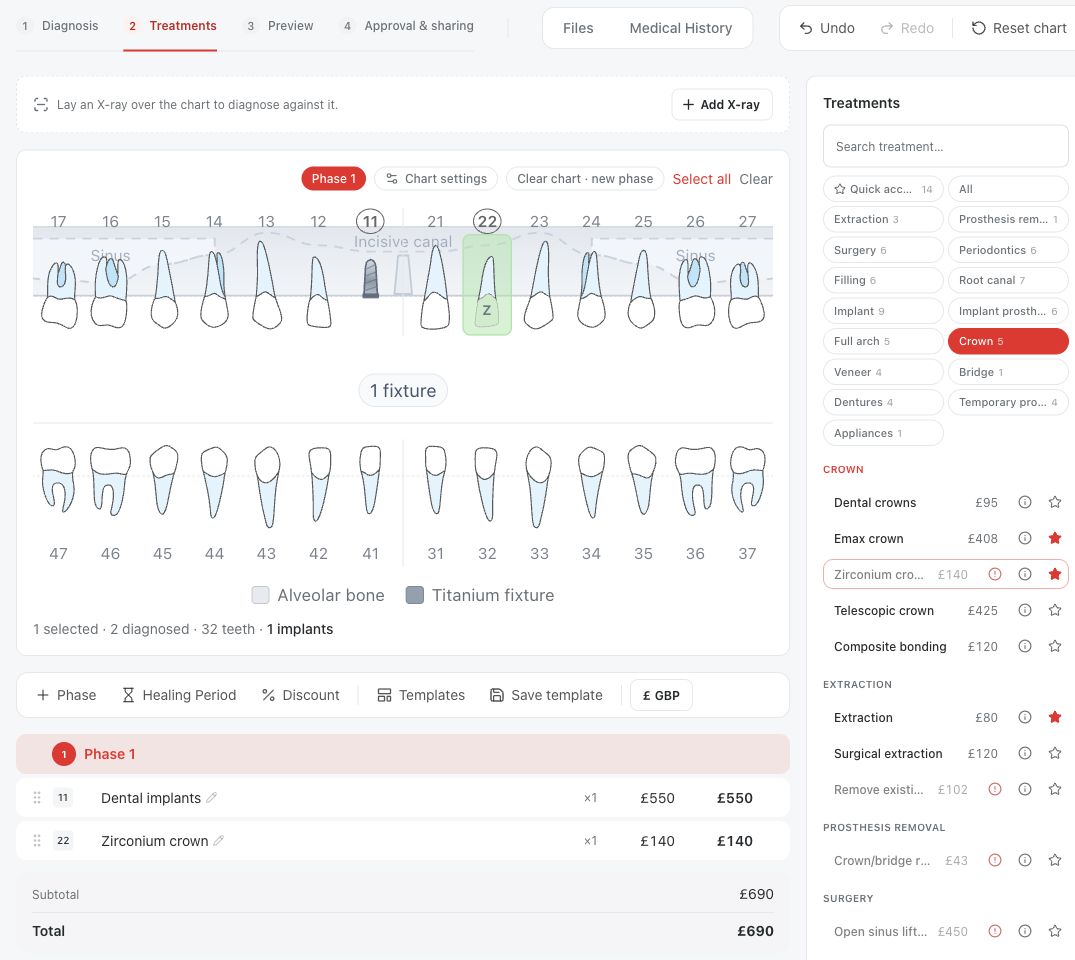
Review the whole quote
Check that each step is on the intended tooth, that the implant and crown are separate proposed treatments, and that any abutment the clinician wants is included. Confirm materials, variants, quantities and totals before sending the plan for review. Medquote's rules are planning checks, not a clinical recommendation; they do not establish anatomical suitability, prognosis or whether a treatment is indicated.
Questions & answers
Does marking a tooth Missing automatically add an implant?
No. Missing is a diagnosis entry. A proposed implant is a separate treatment step.
Can a zirconium crown be added directly to a bare implant?
No. The default rule blocks a crown on an implant that has no abutment. A clinician must assess and plan the restoration sequence.
Are fixture, abutment and crown variants the same thing?
No. The Dental implants item offers fixture-brand variants, Implant abutments offers abutment variants, and Zirconium crown offers crown variants. Review the choice on each resulting step.
Open a plan in your clinic workspace
Sign in through your clinic’s workspace address, then open the patient record and the intended plan. Ask your clinic administrator for the workspace address or permission if needed.
Was this helpful?
Your feedback is saved on this device only.