What you’ll be able to do
The plan uses an active currency with its prices reviewed after recalculation.
Before you start
- An editable treatment plan
- The desired currency is active in the clinic
Choose the plan currency
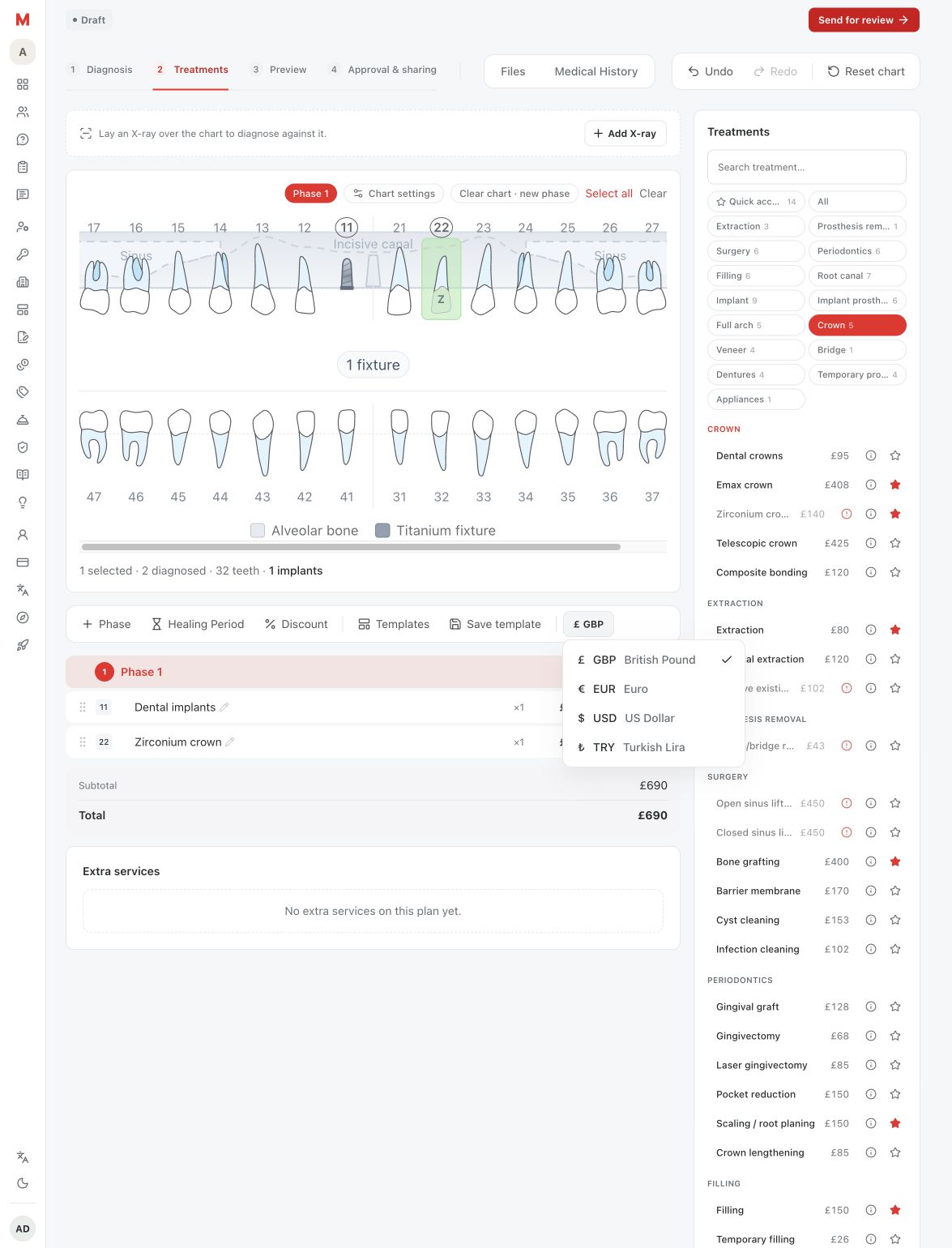
In the Treatments toolbar, open the currency picker, which shows the plan's current symbol and code. Choose one of the clinic's active currencies. Choosing the current currency again changes nothing. If the plan is already approved, Medquote asks you to confirm, because re-pricing voids the approval and the plan will need signing again.
Changing a plan's currency needs permission to edit that plan; the picker is disabled without it. Managing which currencies the clinic offers is a separate task on the Currencies page.
- Open the plan's Treatments tab and find the currency picker in the toolbar.
- Choose the desired active currency.
- If the plan is approved, read the confirmation and choose Re-price and void approval only if you mean to.
Understand the recalculation
Medquote recalculates every treatment-linked row from the catalogue or the selected variant in the new currency. A price you typed by hand on a treatment-linked row is replaced by the catalogue price. Rows with no treatment link, such as a typed discount line, are converted using the exchange rates. Percentage discounts are recalculated from the new prices, and extra services are re-priced in the same change.
This is more than replacing a currency symbol. The plan total can change, and an approved plan returns to Draft and needs a doctor's signature again.
- Compare treatment quantities and unit prices with the clinic's intended quote.
- Re-enter any justified manual price adjustment that was replaced.
- Review the plan's approval state before sharing it.
Review before sharing
Check the new total, individual treatments, extras and discounts. Confirm that the selected currency is the one intended for the patient's document. If the approval was voided, send the plan for review again before you share the revised quote.
Questions & answers
Can I switch currencies without recalculating prices?
No. The plan currency change reprices treatment steps and extras.
Will my manual treatment price be preserved?
A hand-entered override on a treatment-linked row is replaced by the catalogue-derived amount in the new currency. Review and adjust the row again if needed.
Why is there a confirmation dialog?
Re-pricing an approved plan voids its approval, so the editor asks you to confirm first. The dialog reads: Every treatment is re-priced, so the current approval is voided and the plan will need signing again.
Open a plan in your clinic workspace
Sign in through your clinic’s workspace address, then open the patient record and the intended plan. Ask your clinic administrator for the workspace address or permission if needed.
Was this helpful?
Your feedback is saved on this device only.