What you’ll be able to do
The plan is either approved and signed, or back in Draft with a note saying what to change.
Before you start
- A clinic patient record and a treatment plan with at least one treatment.
- At least one doctor in the clinic who can approve plans. Only a doctor Medquote has verified, or one still within the verification grace period, can sign.
- The person sending the plan for review can edit it; the reviewer is a doctor chosen for this plan.
Submit the plan
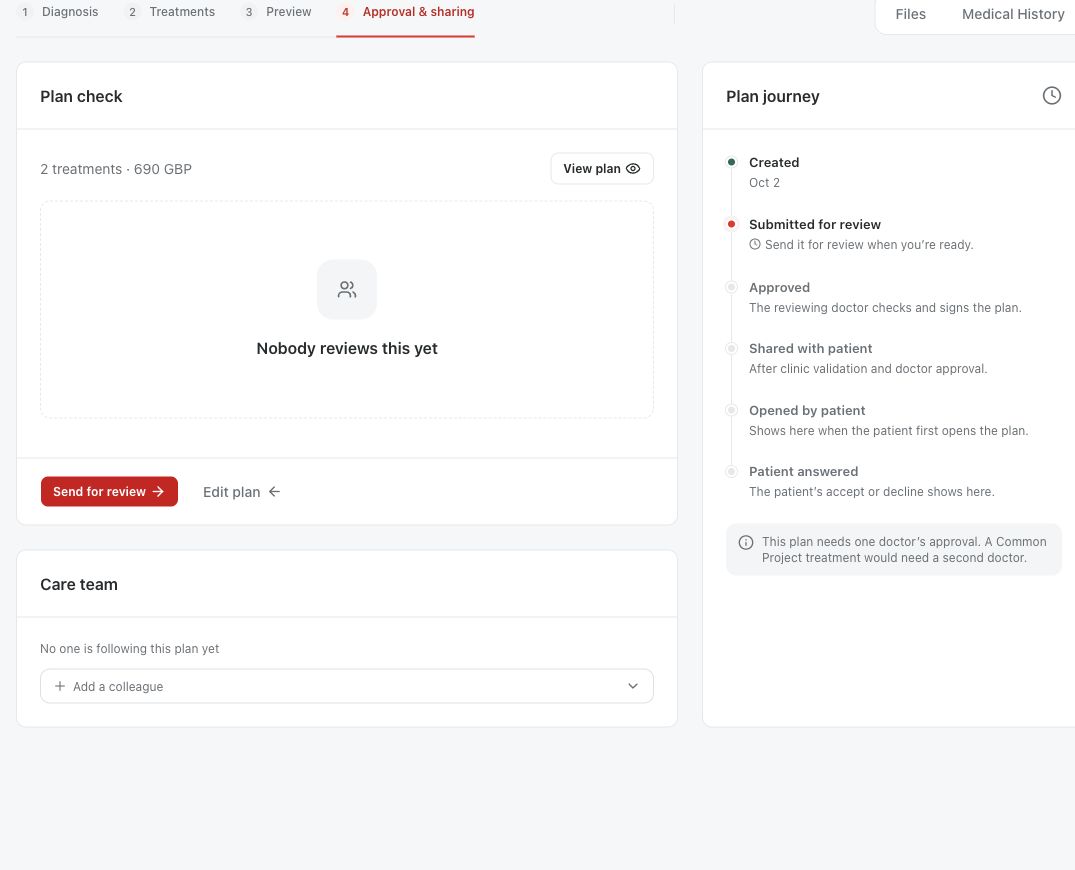
Check the plan before you send it for review. Send for review is on the plan's Approval & sharing step while the plan is in Draft, for anyone who can edit the plan. A plan with a Common Project treatment must go to two doctors.
- Open the treatment plan and check the patient, proposed treatment, notes and amounts.
- Choose Send for review, pick the doctor under Which doctor should review this?, then choose Ask for approval.
- Check that the plan status now reads Waiting for approval. The chosen doctor is notified and finds the plan under Approvals.
Review and decide
The reviewing doctor reads the current plan before deciding. Approval is a professional clinical decision. Only a doctor the plan was sent to can sign it. Admins and Planning Specialists cannot approve plans. If the plan was approved before and then changed, the signing dialog lists what changed under Changed since the last signature.
- Open the plan from Approvals and read the clinical and financial content.
- If something needs changing, choose Request changes, describe it under What needs changing? and choose Send back. The plan returns to Draft.
- If the plan is right, choose Sign and approve. Type your own name exactly as shown, or use Draw and tick the confirmation that the drawing is your signature.
- If the plan changed while you were reading it, Medquote refuses the signature and asks you to reload and read the treatment again.
- Check that the plan shows Approved before anyone shares it with the patient.
After a change request
The person who sent the plan and the person who created it are told the plan came back, with the doctor's note. They revise the plan and send it for review again. A later edit to the treatment or the pricing of an approved plan drops the approval, so the updated plan has to be reviewed again before it is shared.
Questions & answers
Can a Planning Specialist or an admin approve for a doctor?
No. Only a doctor the plan was sent to can sign and approve it, and the signature is recorded against that doctor's own account. A plan with a Common Project needs two different doctors.
What does Changed since the last signature mean when I sign?
The plan was approved before, then edited, and is back for signing. The list names what changed since the earlier signature, such as a treatment added or removed or a new total. Read those lines. If any change is unexpected, choose Request changes and ask the person who sent the plan.
Open a plan in your clinic workspace
Sign in through your clinic’s workspace address, then open the patient record and the intended plan. Ask your clinic administrator for the workspace address or permission if needed.
Was this helpful?
Your feedback is saved on this device only.