What you’ll be able to do
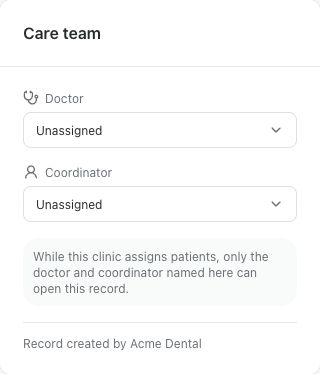
The patient record shows the intended doctor and coordinator on its Care team card.
Before you start
- The clinic patient record exists and you can open it.
- You can see every patient in the clinic. Admins and Planning Specialists can by default; doctors cannot change the care team.
- The colleagues you want are active members of the clinic team.
Open the patient record
Assignments are made on the clinic patient record, in the Care team card. If the patient also has a Medquote patient account, link it to the right record first so the team works on the intended record.
- Find and open the correct clinic patient record.
- Find the Care team card and check the Doctor and Coordinator shown.
Choose the team
Doctor and Coordinator are separate choices, and either can be Unassigned. The Doctor list offers the doctors who can approve plans. The Coordinator list offers active colleagues who can send plans, so a Planning Specialist can fill it even when your package has no Coordinator role. A change saves as soon as you pick a name; there is no separate save button.
- Choose the responsible doctor in the Doctor list.
- Choose a colleague in the Coordinator list, if one is needed.
- Wait for the confirmation that the patient was reassigned, then check both names on the card.
Check access
What the assignment changes depends on how your clinic shares patients. If your clinic assigns patients, the card says so: the record can then be opened only by the doctor and coordinator named there, the person who created the record and colleagues who can see every patient. If your clinic works from a shared pool, the assignment records who is responsible and does not change who can open the record. If a colleague is missing from a list, an administrator should check that their account is active and their role.
Questions & answers
Why can't I change the care team?
Changing the care team needs permission to see every patient in the clinic. Admins and Planning Specialists have it by default, doctors do not. Ask an administrator to check your role.
Can the coordinator close the patient's conversations?
Not because of the assignment alone. Anyone who can open the patient's record can read and reply to that patient's conversations. Closing a conversation needs the clinic permission for that kind of conversation.
Open the patient's care team
Sign in through your clinic’s workspace address, then open the patient record and its Care team card. Ask your clinic administrator for the workspace address or permission if needed.
Was this helpful?
Your feedback is saved on this device only.