What you’ll be able to do
Your clinic receives your answers and any files you added.
Before you start
- An active intake link issued by your clinic
- Details and files the clinic has asked you to provide
Check the clinic and open the link
An intake link is a private link from one clinic, and it stops working after a while. Open the link your clinic sent and check the clinic name. If the link no longer opens, ask the clinic for a new one.
An intake form and a Medquote patient account are different things. The form adds information to your record at the clinic; it does not link a patient account to that record.
Review details and answer the questions
Check the name and contact details at the top. The form asks What brings you in?, Allergies and Medication you take regularly. If your clinic record is linked to your Medquote patient account, your name and contact details come from the account, so change them there.
- Check your name, email, phone and date of birth.
- Answer the questions that apply to you.
- Correct any answer that is already filled in and no longer right.
- If your record follows your patient account, change your name or contact details in the account.
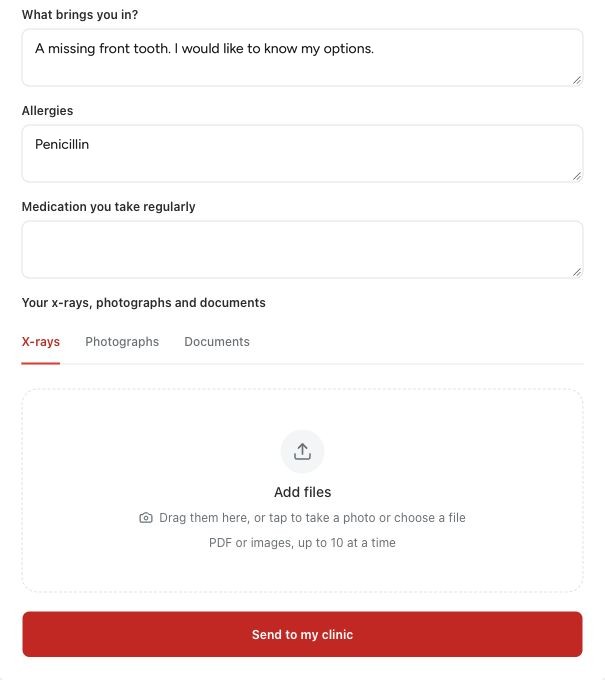
Attach supported files
Photographs and x-rays are optional. Under Your x-rays, photographs and documents, choose the X-rays, Photographs or Documents tab for each file. You can add up to ten files at a time, each up to 20 MB, as PDF, JPEG, PNG, WebP or HEIC.
Some browsers cannot show a preview of every allowed file type. If your clinic asks for a particular format, use it.
Submit and confirm
Choose Send to my clinic and wait for the page to confirm that the clinic has received your details. If a field or file is marked, correct it and send again. Choosing files or filling in the form is not enough on its own.
After sending, you can still send more files or corrections from the same page until the date it shows. If something important changes, contact your clinic as well. The intake form is not a diagnosis or a treatment approval.
Questions & answers
Do I need a patient account to open an intake link?
No. The intake link works on its own. Your clinic may use a patient account for other things, such as sharing your file or treatment plans.
Does the intake form create a treatment plan?
No. It collects information. The care team still creates and reviews a plan.
Why can I not change some identity details here?
If your record at the clinic is linked to your Medquote patient account, the account is where your name and contact details come from. Change them in your patient account.
Open the intake link your clinic sent
Open the private link your clinic sent you. If the link is missing or no longer works, ask your clinic for a new one.
Was this helpful?
Your feedback is saved on this device only.