What you’ll be able to do
An upper-jaw All-on-4 package is added as a set of reviewable plan steps.
Before you start
- An editable treatment plan for the patient
- The clinic's Full arch catalogue includes All-on-4
- The patient's chart and proposed treatment have been assessed by a qualified clinician
Review the chart first
Open the patient's plan and look at the upper-jaw findings in the Diagnosis step. Record findings that are supported by the patient's examination. Medquote uses those findings to draw the chart and to check ordinary tooth-level treatments; they are not a substitute for a clinical assessment.
- Confirm the intended plan and patient.
- Review the upper-jaw diagnosis and any existing implant or treatment steps.
Add the package to the upper jaw
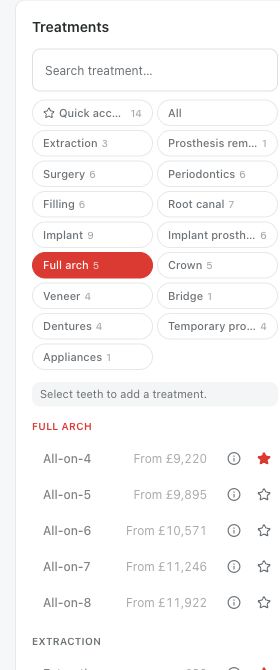
In Treatments, select at least one upper-jaw tooth so the editor can infer the jaw, then choose All-on-4 from the Full arch catalogue. If the selection does not identify one jaw, the editor asks you to choose Upper jaw or Lower jaw. The package is anchored to the jaw; it is not applied as a separate treatment to every selected tooth.
- Select an upper-jaw tooth on the chart.
- Choose All-on-4 in the Full arch treatment catalogue.
- If the jaw dialog appears, choose Upper jaw.
Review the generated steps
Medquote expands the package into treatment rows. Its default upper fixture sites are 15, 12, 22 and 25. The rows can include extraction of teeth still standing, new fixtures where there is no existing fixture, multi-unit abutments, a PMMA provisional, a healing marker, a Toronto base, a superstructure priced per unit of the span and prosthetic screws. An already missing arch has no extraction row, and an existing fixture at a package site is not placed or charged a second time.
The package price shown in the catalogue is not charged as one row. The quote adds up the component rows in the plan currency. Review every row, quantity, variant and price before you send the plan for review: a component your clinic does not stock is left out rather than added.
- Check the generated tooth sites and grouped steps.
- Check which extractions or implants were omitted because of the current chart.
- Review quantities and the plan total against the clinic's intended quote.
Submit for clinical review
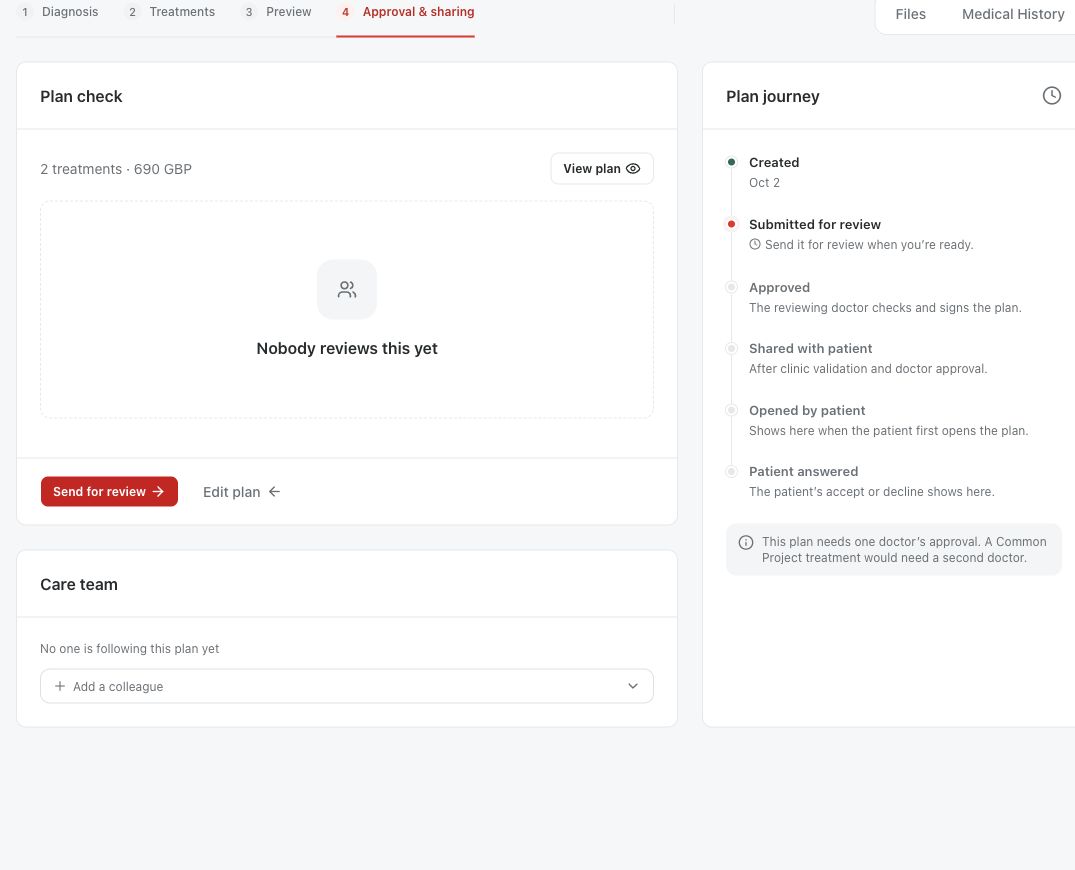
The fixed fixture layout and the generated protocol are software defaults. They are not a clinical recommendation and do not establish eligibility, anatomical suitability or the right treatment for this patient. The responsible clinician reviews the patient-specific plan before it is approved or shared. Medquote refuses a second full-arch system on the same jaw, while upper and lower packages stay separate.
Questions & answers
Must I select all upper teeth?
No. The editor uses a single-jaw selection to identify Upper jaw; the package itself is applied at jaw level.
Will it extract every upper tooth?
The generated extraction step includes teeth the chart currently treats as standing. It is omitted for an edentulous upper jaw. A clinician must verify the chart and the resulting steps.
Can I change the All-on-4 brand before adding it?
The package has no package-level variant. Review any generated implant or prosthetic component choices in the plan instead.
Open a plan in your clinic workspace
Sign in through your clinic’s workspace address, then open the patient record and the intended plan. Ask your clinic administrator for the workspace address or permission if needed.
Was this helpful?
Your feedback is saved on this device only.