What you’ll be able to do
The clinic has a reviewed base currency and active quote currencies with appropriate rate modes.
Before you start
- The permission to manage currencies (admins by default)
- A decision on which currency is the clinic's base
- An exchange-rate feed set up for your clinic if you want automatic rates
Review the currency table
Open Currencies in your clinic workspace. The table shows each currency's code, name, symbol, rate, rate mode, status and the number of treatment price overrides. The base currency is marked Base. Managing this table needs the permission to manage currencies; it is separate from changing the currency of one treatment plan.
- Review the current base currency and active choices.
- Check any existing manual rates and treatment-price override counts.
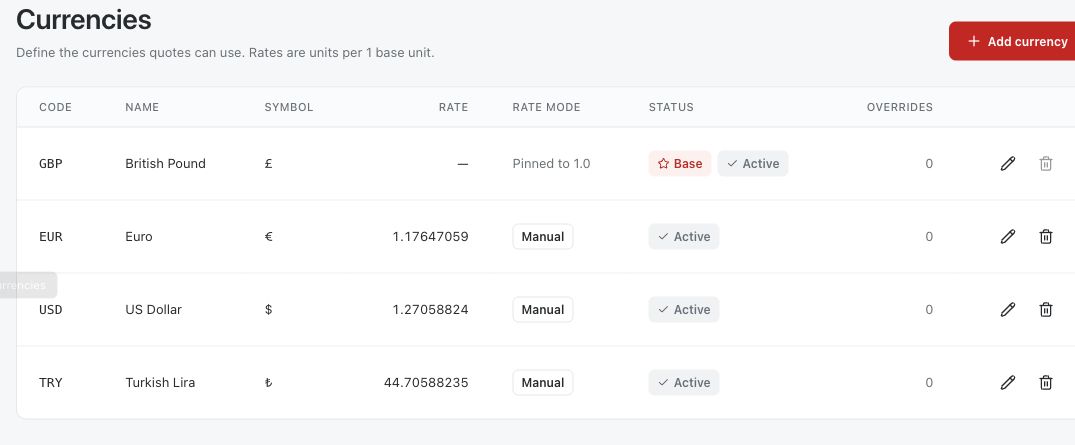
Add or edit a currency
Choose Add currency, or the edit button on an existing row. Enter a three-letter code, a name, a symbol and an exchange rate above zero. Set the ordering and whether the currency is active. Only active currencies can be chosen for a plan.
Choose Manual to keep the rate up to date yourself. Choose Automatic to have the rate refreshed every day at 05:00 from the exchange-rate feed; while Automatic is on, the rate cannot be edited by hand. If no feed is set up, the page warns that automatic rates will not change; use Manual until a feed is in place.
- Open Add currency or edit the desired row.
- Set code, name, symbol, ordering and active state.
- Choose Manual or Automatic, review the exchange rate or feed status, then save.
Keep one base currency
The base currency is the unit every other rate is quoted in. Making a currency the base removes the mark from the previous base. The base is pinned to 1.0, always active and always Manual, and it cannot be deleted while it is the base.
To retire the current base, make another currency the base first, then review the other rates and prices. Changing the base does not remove treatment price overrides.
- Select the intended base currency in its edit dialog and save.
- Review the table to confirm it is marked Base and active.
- Review non-base rates and pricing after the change.
Review automatic rates and removal
Automatic refresh updates the non-base currencies set to Automatic. If the feed fails or returns an invalid rate, the previous rate stays. Each automatic row shows when it was last refreshed. Check current rates before quoting patients.
The base currency cannot be deleted. For any other currency, Medquote asks you to confirm, and if it has treatment price overrides it says they will be removed with it. Changing a plan's currency is a separate step in the plan, and that is what re-prices the plan.
- Check the rate mode and the last-refreshed time for automatic currencies.
- For a non-base currency no longer needed, review its override count and confirm deletion only when appropriate.
- Open an affected plan separately if its quote currency or prices must change.
Questions & answers
Can the base currency use Automatic rates?
No. The base currency stays Manual, active and fixed at a 1.0 rate.
What happens if the automatic-rate feed is unavailable?
The previous rate stays in place. If no feed is set up at all, the Currencies page warns that automatic rates will not change.
Does changing a currency here change an existing plan's currency?
No. A plan's currency is changed in that plan's Treatments toolbar, where Medquote re-prices the quote.
Manage currencies in your clinic
Sign in through your clinic’s workspace address, then open Currencies. Ask your clinic administrator for the workspace address or permission if needed.
Was this helpful?
Your feedback is saved on this device only.